TL;DR: AI agents can’t parse your HTML effectively. The llms.txt standard (backed by Anthropic, Cloudflare, and others) gives them a discovery file pointing to markdown versions of your content. I implemented it on this blog today—here’s exactly how, with code examples you can copy.
Table of contents
Open Table of contents
The Problem I Didn’t Know I Had
I was deploying this blog to Cloudflare Pages yesterday when a thought hit me: if I’m building an AI-focused technical blog, shouldn’t my blog be readable by AI agents?
Think about it for a moment. You ask Claude to “check out that blog post about context engineering.” Claude fetches the URL. It gets back… HTML. Script tags. Tailwind classes. Navigation elements. Footer links. Cookie banners.
Somewhere in there is your actual content. Good luck finding it.
Here’s the thing: we built the web for humans with browsers. CSS makes it pretty. JavaScript makes it interactive. But AI agents don’t care about pretty. They care about content.
The irony wasn’t lost on me. I’m building an AI-focused technical blog, on a site that AI can barely read. Sure, AI companies are building headless browser solutions—but is that really the long-term vision? Just to read a blog post, you need to spin up Chrome, have an AI agent drive it, parse the rendered DOM, and extract content from a sea of markup. That’s not efficient. That’s not scalable. That’s a workaround, not a solution.
The Numbers Don’t Lie
I tested this on my own site. This very blog post you’re reading:
- Rendered HTML: ~135KB / ~30,000-35,000 tokens
- Raw markdown: ~15KB / ~3,500-4,000 tokens
- llms.txt discovery file: ~800 bytes / ~200 tokens
That’s a 9x reduction from HTML to markdown. When context windows cost money and every token counts, that difference matters.
What AI Agents Actually Want
When an AI agent visits your site, it wants:
- Discovery - What content exists here? What’s important?
- Navigation - How do I get to specific pieces?
- Content - The actual text, in a format I can parse
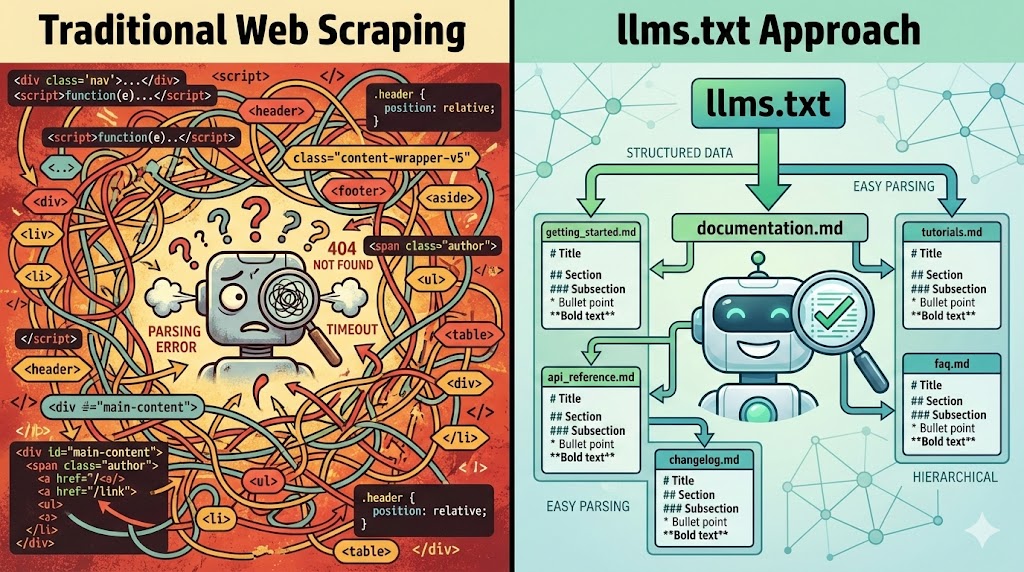
HTML gives you none of this cleanly. Sure, agents can scrape it. But they’re parsing your navigation bar, your social links, your “Subscribe to newsletter” popup. Signal buried in noise.
What they actually want: Markdown. Clean, structured, semantic markdown.
# Post Title

The actual content starts here.

## Section One

More content...
No classes. No divs. No scripts. Just content.
Enter llms.txt
The llms.txt standard emerged to solve exactly this problem. It’s simple:
- Create a
/llms.txtfile at your root - List your content with links to markdown versions
- Update robots.txt to point AI agents to it
That’s it. No SSR. No middleware. No infrastructure changes.
Who’s Behind It?
I first came across llms.txt when researching how to make documentation AI-accessible. The standard was created by Jeremy Howard (co-founder of Answer.AI, fast.ai, former Kaggle president) in September 2024. That got me thinking—if someone with that pedigree is proposing this, it’s worth paying attention.
Since then, adoption has accelerated:
- Anthropic adopted it for Claude’s ingestion pipeline
- Mintlify rolled it out across thousands of docs sites
- Cursor uses it to improve code completions
- Cloudflare includes llms.txt support in their AI Index
The spec is at llmstxt.org. It’s not theoretical—it’s already in production across thousands of sites.
The Implementation Journey
Here’s exactly what I built today. You can do this in an afternoon.
Step 1: Create /llms.txt
This is your discovery file. It tells AI agents what exists and how to access it.
# vanzan01's Blog

> Context Engineering and AI development.
> Engineering discipline meets AI.

This blog covers AI development, context engineering,
and technical leadership from a practitioner's perspective.

## Markdown Access

All content on this site is available in raw markdown format.
Append `.md` to any URL:

- [Homepage](/index.md)
- [All Posts](/posts.md)
- [About](/about.md)
- [Archives](/archives.md)

## Content

- [Posts Index](/posts.md): Complete list of all blog posts
  with dates and links
- [RSS Feed](/rss.xml): Subscribe to updates

## Topics

- Context Engineering
- AI Development
- Claude Code
- Technical Leadership
- Open Source
Put this in /public/llms.txt for static sites. It gets copied to your output directory at build time.
Step 2: Update robots.txt
Add the LLMs directive so agents know where to look:
// src/pages/robots.txt.ts
import type { APIRoute } from "astro";

const getRobotsTxt = (sitemapURL: URL, siteURL: URL) => `
User-agent: *
Allow: /

Sitemap: ${sitemapURL.href}

# AI Agent Discovery (llms.txt standard)
# See: https://llmstxt.org/
LLMs: ${siteURL.href}llms.txt
`;

export const GET: APIRoute = ({ site }) => {
  const sitemapURL = new URL("sitemap-index.xml", site);
  const siteURL = site
    ? new URL(site)
    : new URL("https://yourdomain.com");
  return new Response(getRobotsTxt(sitemapURL, siteURL));
};
The LLMs: directive is the key addition. It’s the equivalent of Sitemap: but for AI agents.
Step 3: Create Markdown Endpoints
This is where most people get stuck. You need to serve markdown versions of your pages.
Option A: Simple static files
For pages that don’t change often (about, archive), you can just create .md files:
/public/about.md
/public/archives.md
Option B: Dynamic API routes (recommended)
For content that changes—like your posts index—use API routes:
// src/pages/posts.md.ts
import { getCollection } from "astro:content";
import type { APIRoute } from "astro";
import getSortedPosts from "@/utils/getSortedPosts";

export const GET: APIRoute = async () => {
  const posts = await getCollection("blog");
  const sortedPosts = getSortedPosts(posts);

  let markdownContent = `# All Posts\n\n`;

  // Group posts by year
  const postsByYear = sortedPosts.reduce(
    (acc, post) => {
      const year = post.data.pubDatetime.getFullYear();
      if (!acc[year]) acc[year] = [];
      acc[year].push(post);
      return acc;
    },
    {} as Record<number, typeof sortedPosts>
  );

  // Sort years descending
  const years = Object.keys(postsByYear)
    .sort((a, b) => Number(b) - Number(a));

  for (const year of years) {
    markdownContent += `## ${year}\n\n`;

    for (const post of postsByYear[Number(year)]) {
      const date = post.data.pubDatetime.toLocaleDateString(
        "en-US",
        { month: "short", day: "numeric" }
      );
      markdownContent +=
        `- ${date}: [${post.data.title}](/posts/${post.id}.md)\n`;
    }
    markdownContent += "\n";
  }

  return new Response(markdownContent, {
    status: 200,
    headers: {
      "Content-Type": "text/markdown; charset=utf-8",
      "Cache-Control": "public, max-age=3600",
    },
  });
};
This generates a clean markdown index at build time:
# All Posts

## 2026

- Jan 4: [Making Your Blog AI-Agent Friendly](/posts/llms-txt.md)

## 2025

- Jan 2: [Hello World](/posts/hello-world.md)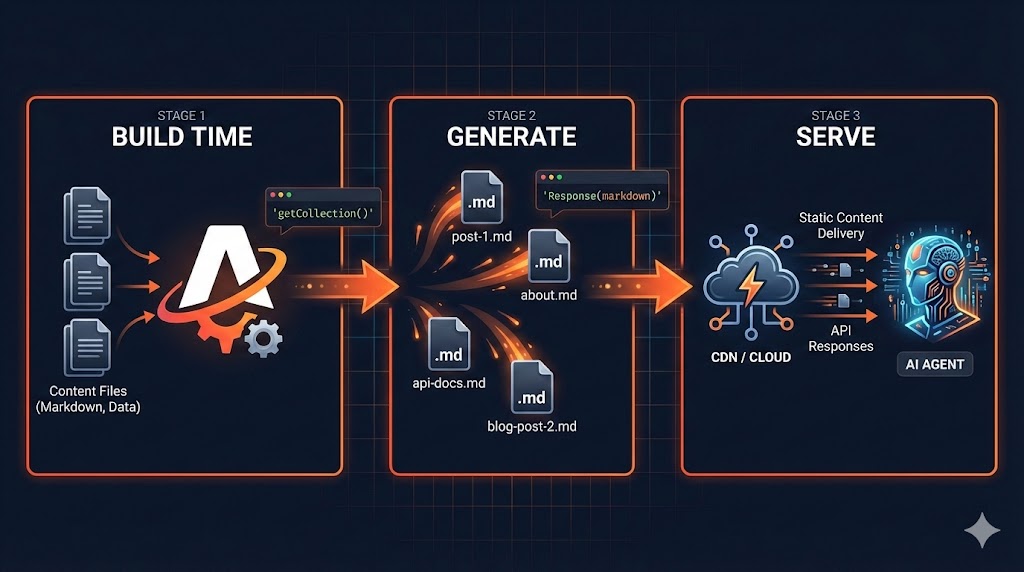
Step 4: Individual Post Endpoints
For individual blog posts, you have two options:
If your source is already markdown, read and serve it directly:
// src/pages/posts/[slug].md.ts
import type { APIRoute } from "astro";
import { getCollection } from "astro:content";
import fs from "fs";
import path from "path";

export async function getStaticPaths() {
  const posts = await getCollection("blog");
  return posts.map((post) => ({
    params: { slug: post.id },
    props: { post },
  }));
}

export const GET: APIRoute = async ({ props }) => {
  const { post } = props;

  // Read the raw markdown file
  const filePath = path.join(
    process.cwd(),
    "src/content/blog",
    `${post.id}.md`
  );

  const rawContent = fs.readFileSync(filePath, "utf-8");

  return new Response(rawContent, {
    status: 200,
    headers: {
      "Content-Type": "text/markdown; charset=utf-8",
      "Cache-Control": "public, max-age=3600",
    },
  });
};
The Road Not Taken: SSR and Content Negotiation
I’ll be honest—my first instinct was fancier.
Content negotiation lets the same URL serve different formats based on the Accept header:
# Request HTML
curl https://blog.example.com/posts/my-post

# Request markdown
curl -H "Accept: text/markdown" https://blog.example.com/posts/my-post
Same URL, different content. Elegant, right?
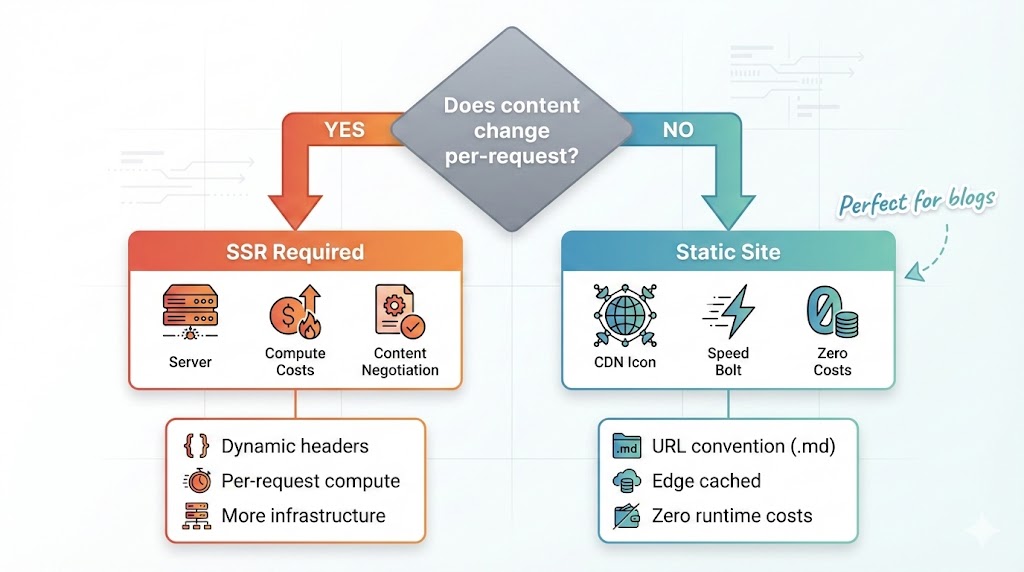
Here’s the thing: it requires SSR.
Static sites (Astro, Next.js static export, Hugo, Jekyll) generate files at build time. No server running means no header inspection means no content negotiation.
I actually built the middleware:
// functions/_middleware.ts (Cloudflare Pages)
export async function onRequest(context) {
  const acceptHeader = context.request.headers.get("accept") || "";

  if (acceptHeader.includes("text/markdown")) {
    const mdUrl = new URL(context.request.url);
    mdUrl.pathname = mdUrl.pathname + ".md";
    return context.env.ASSETS.fetch(mdUrl);
  }

  return context.next();
}
It didn’t work. Cloudflare Pages Functions don’t run for static sites without the SSR adapter.
The trade-off became clear:
| Static Site | SSR | |
|---|---|---|
| Speed | Lightning fast (CDN edge) | Slower (compute required) |
| Cost | Nearly free | Compute costs |
| Complexity | Simple | More infrastructure |
| Content negotiation | No | Yes |
| Cold starts | None | Yes |
For a blog, static wins. The URL convention (.md suffix) is slightly less elegant but works perfectly with zero infrastructure.
Testing the Discovery Flow
Here’s the moment of truth. I tested this by acting as an AI agent would:
Step 1: Check robots.txt
curl https://blog.vanzan01.org/robots.txtResponse includes:
LLMs: https://blog.vanzan01.org/llms.txtStep 2: Fetch llms.txt
curl https://blog.vanzan01.org/llms.txtReturns the discovery file with links to /posts.md, /about.md, etc.
Step 3: Navigate to posts index
curl https://blog.vanzan01.org/posts.mdReturns clean markdown listing all posts with links.
Step 4: Fetch a specific post
curl https://blog.vanzan01.org/posts/2026/hello-world.mdReturns the raw markdown content.
It works. An AI agent can now:
- Discover my site structure
- Navigate to content
- Read clean markdown
No HTML parsing. No DOM traversal. No headless browser. Just content.
Why This Matters
Here’s the bigger picture.
We’re moving into an era where AI agents will browse the web for us. Not replace human browsing—augment it. “Claude, summarise that article I bookmarked.” “Find recent posts about context engineering.”
Websites that are AI-readable will get cited. AI-hostile sites will get skipped.
Think about it:
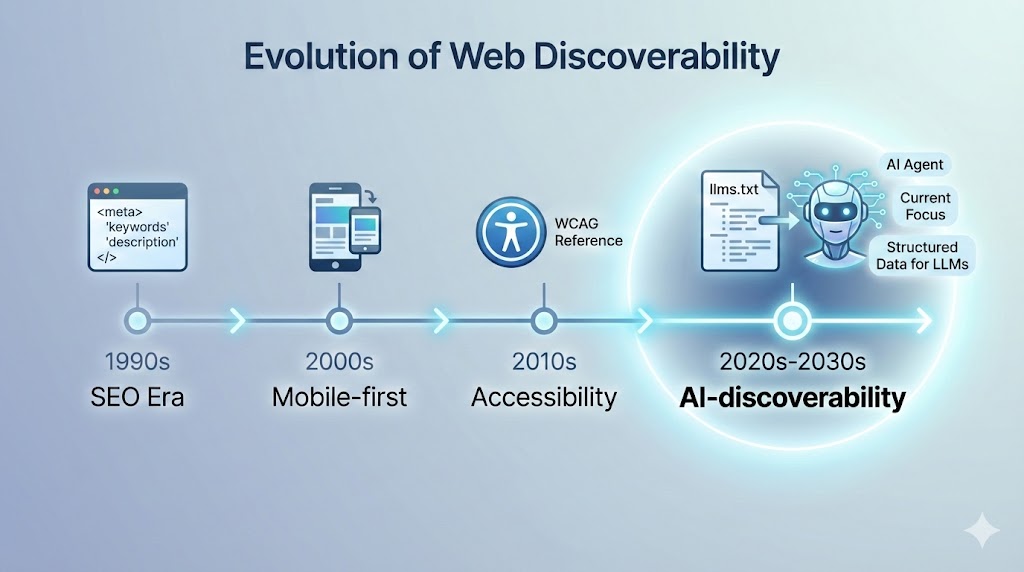
SEO was about being discoverable to Google. AI-discoverability is about being useful to agents.
The sites that figure this out early will have an advantage. Not a huge competitive moat—it’s too simple for that. But a head start in thinking about content as both human-readable and machine-readable.
What You Can Do Today
If you run a static site (Astro, Next.js, Hugo, Jekyll, etc.), here’s your action list:
- Create
/llms.txt- Static file in your public folder - Update robots.txt - Add the
LLMs:directive - Create markdown endpoints - API routes or static files
- Test the flow - Curl through the discovery chain
Total time: An afternoon. No SSR. No infrastructure changes. No costs.
The spec is at llmstxt.org. This blog’s implementation is open source on GitHub.
The Bigger Question
I started this morning wanting to deploy a blog. I ended up thinking about how AI agents will browse the web.
But here’s what’s really interesting: the big question isn’t whether AI agents will talk to your website. It’s whether they’ll talk to your agent.
Think about it. Right now we’re building discovery mechanisms so AI can read our static content. But what happens when your personal AI agent needs information from my blog? Does it really need to hit a website at all? Or does your agent talk directly to my agent?
Websites might just be a transition phase.
The llms.txt standard is a bridge—making today’s static web accessible to AI. But the destination might be agent-to-agent communication, where websites are just one rendering of information that flows directly between systems.
The llms.txt standard is simple—almost too simple. But that’s the point. It works with what we have today. And it’s a step toward wherever this is all going.
Make your content AI-readable. The agents are already looking. Where does that leave your site?
Have you implemented llms.txt on your site? I’d love to hear about your approach—especially if you’re thinking about agent-to-agent communication and what comes after websites.