TL;DR: Pipelines are the application. UIs are just clients. Build the pipeline first, then choose how to operate it: UI, CLI, webhook, or schedule.
Harnessing Wild AI: Why the Pipeline is the Product
I tried to show someone what I’d been building with AI agents last month.
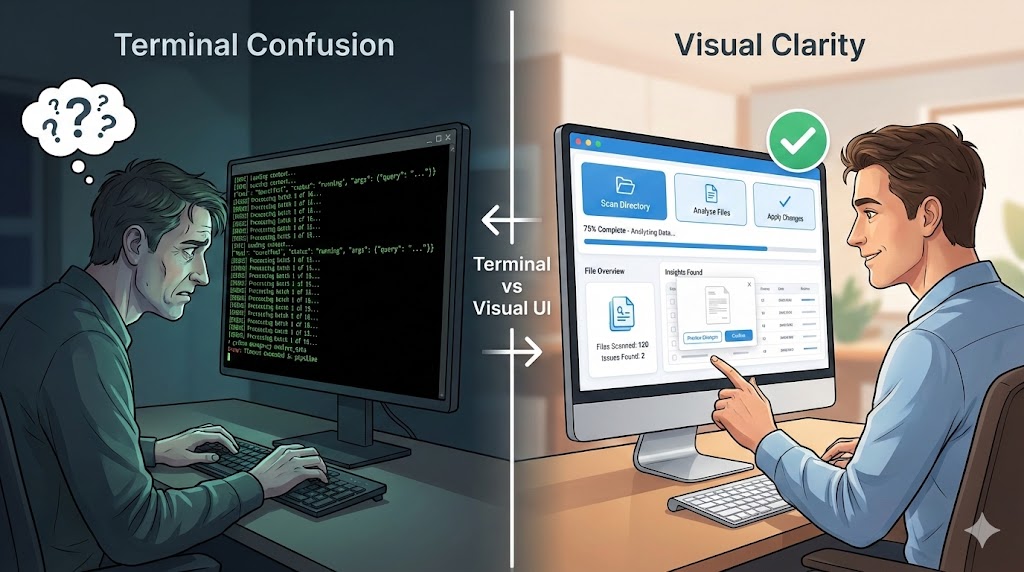
I opened a terminal. Showed them Claude Code running. Watched the agent analyze files, make decisions, execute commands. Green text scrolling by. JSON responses. Tool calls. Context loading.
Their eyes glazed over. “That’s… great. But what does it do?”
People are visual. They need to know that when they push a button, something happens. They need to see the result. A terminal full of streaming JSON doesn’t cut it.
That conversation stuck with me. There’s an opportunity here that I don’t see many people talking about.
Stuck at the Developer Harness
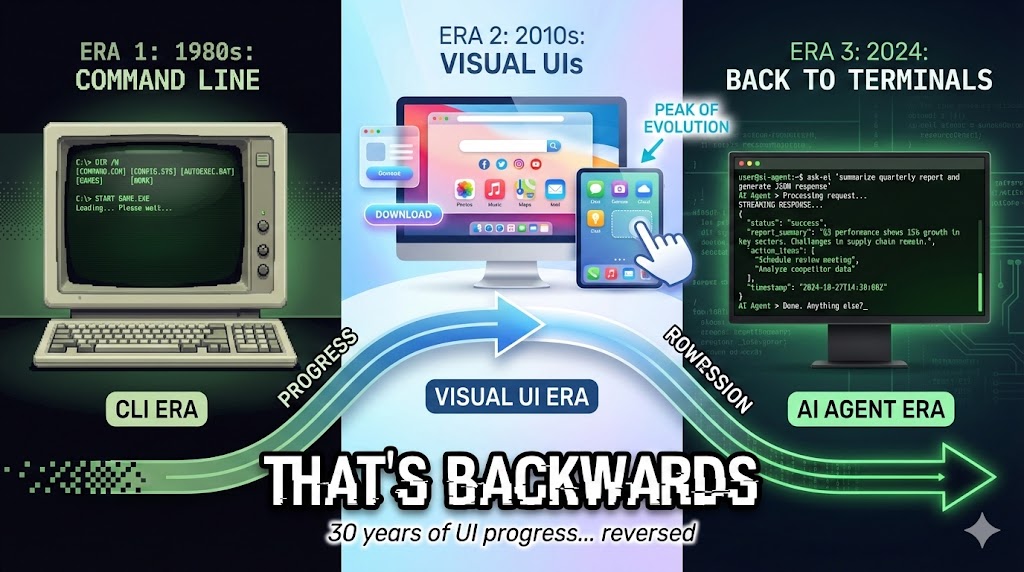
What’s happening right now in AI: we’re pushing it to developers and coders. CLI agents. Autonomous systems. Terminal interfaces. Streaming responses.
And it works for us. For building. For testing. For iterating. The CLI is a perfectly good harness for development.
But here’s the thing: you can’t ship logs.
Developers building with AI tools (Claude, Cursor, ChatGPT) are creating incredible things. Agent workflows that actually work. But they’re stuck at the CLI layer. The output is a terminal session. They can’t give it to their mum, their friend, their boss. Not because CLI is bad (it’s great for development), but because there’s more needed to make it a product:
- Inputs/outputs: Where do parameters come from? Where do results go?
- Storage of runs: Can you see what happened yesterday? Last week?
- Approvals: Can someone review and approve before action?
- Sharing a link: Can you send it to someone who wasn’t there?
- Scheduled execution: Does it run without you starting it?
Developers face the same situation. They’re building agents for businesses, for enterprises, for customers. But their output is still code talking to code. When it comes time to show the business what they built? Eyes glaze over.
The CLI isn’t the issue. Productisation is the opportunity. Packaging + repeatability + distribution + observable artifacts. That’s where things could be better.
The Insight I Keep Coming Back To
What I realised while building with the Claude Agent SDK:
Pipelines are the application. UIs are just clients.
Let me explain what I mean.
When most people think about building an AI application, they think:
- Build the logic layer
- Write the code
- Bolt AI onto it
- Create a frontend
That’s the old way. Code-first, AI bolted on. The frontend is the application.
But there’s another way:
- Start with AI (the wild horse)
- Harness it with an SDK (define workflows, constraints, checkpoints)
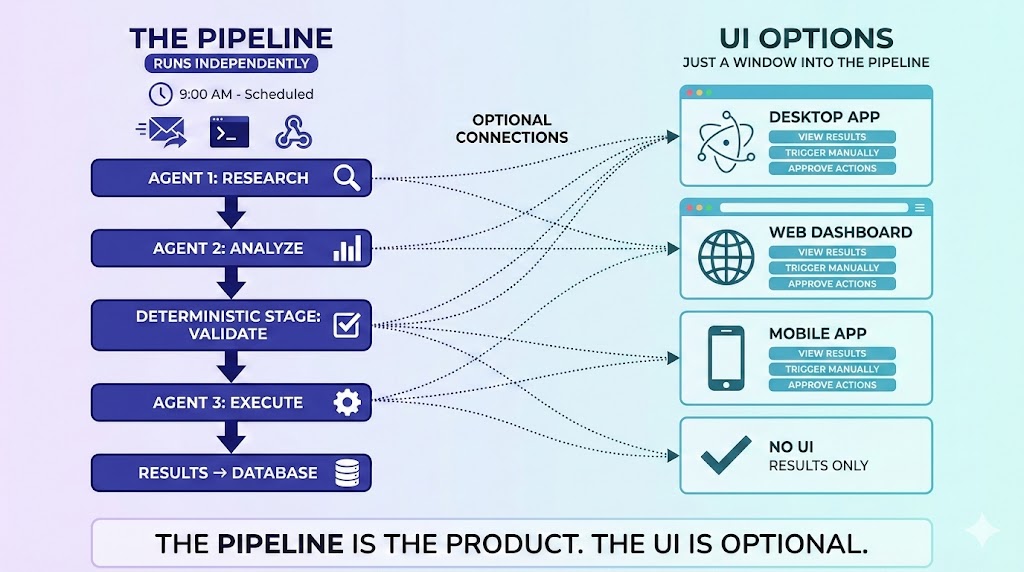
- The pipeline runs independently. It’s the deployable unit
- The UI is just one client that can operate the pipeline
AI-first. Harnessed. Then clients.
The difference is fundamental. In the old model, the app contains the AI. In this model, the pipeline is the application. The UI doesn’t contain anything: it renders pipeline state and artifacts, and optionally triggers runs. So does a Slack bot. So does a webhook. So does a scheduled job.
Pipeline vs UI: The Separation That Changes Everything
There are two completely separate components:
The Pipeline (the application):
- Agent workflows with deterministic stages
- Runs independently: on a schedule, triggered by webhook, or by command
- Loops, validates, stores artifacts
- Produces results whether anyone’s watching or not
- Has its own runtime (container, job, service)
The UI (one possible client):
- Renders pipeline state and artifacts
- Can trigger pipeline runs manually
- Shows what happened at each stage
- Completely optional, just one operator among many
The contract is simple: the UI doesn’t contain the agent. It renders pipeline state/artifacts and optionally triggers a run. That’s it. The same contract applies to a Slack bot, an API endpoint, an email trigger, or a scheduled job.
Most people are trying to shove the agent inside the application. They build a frontend, then try to make agents work within it.
I’m saying: the pipeline is the application. Everything else is a client.
Packaging the Pipeline (So It’s Actually a Product)
This is the piece everyone skips: making the pipeline deployable.
A pipeline isn’t a product until it has:
Runtime: Container, job, or service that can run independently. Not “run this script in my terminal”. An actual deployable unit with its own process.
State/Artifacts Store: Where do inputs come from? Where do outputs go? Can you see previous runs? Diff results? Re-run with the same inputs?
Triggers: Schedule (cron, Task Scheduler, CI/CD), webhook (API call starts a run), or UI (human clicks “Run”). Multiple entry points, same pipeline.
Skills/Apps as Modules: These aren’t just prompts. They’re reusable product modules. A “pdf-processor” skill can be used in ten different pipelines. Declare it once, use it everywhere.
The starter kit gives you the first two (runtime + artifacts). Triggers are your infrastructure choice. Skills are the building blocks you compose into pipelines.
What This Actually Looks Like: The AI News Tweet Demo
Let me show you what I mean with a concrete example.
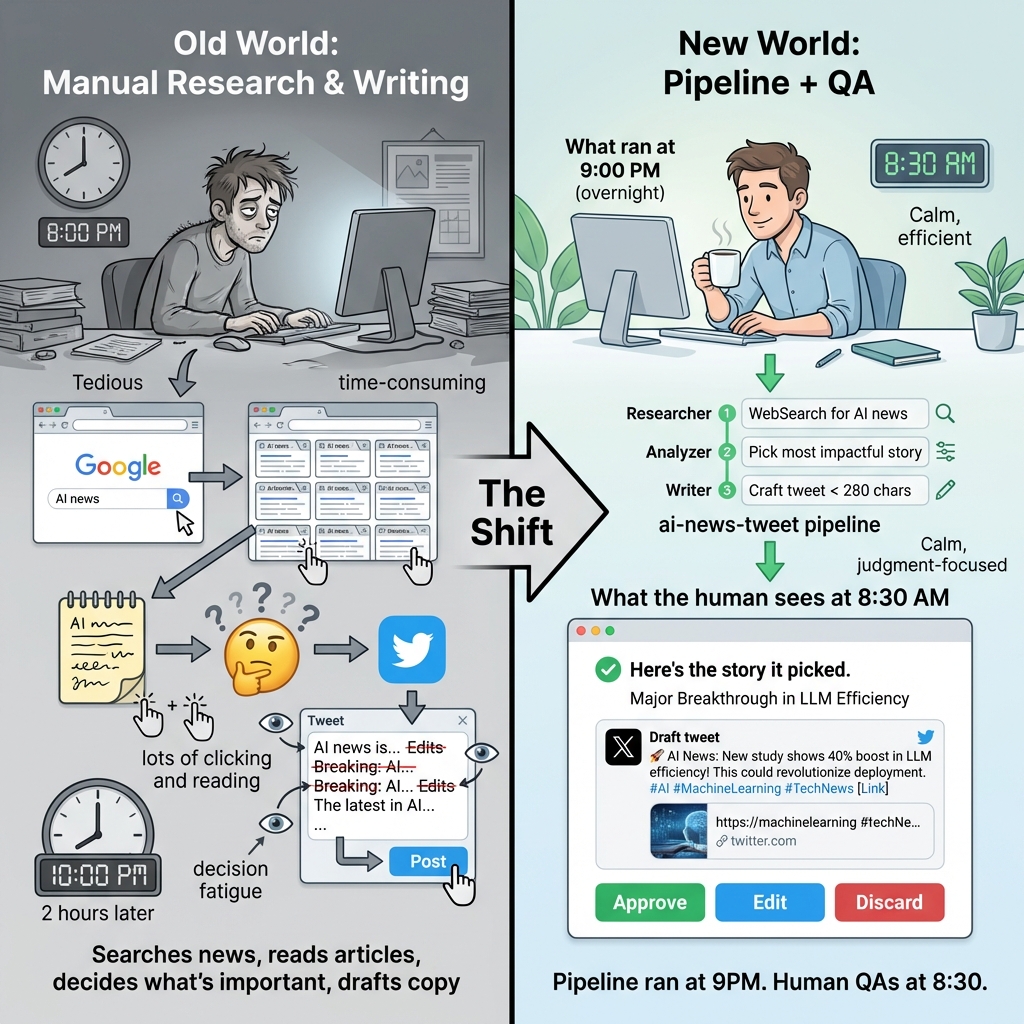
The starter kit includes an ai-news-tweet demo: a 3-stage pipeline.
Stage 1: Researcher → WebSearch for latest AI news Stage 2: Analyzer → Pick the most impactful story Stage 3: Writer → Craft a tweet under 280 characters
Same pipeline, multiple entry points:
UI path (for humans): Open the starter kit UI, select ai-news-tweet, click Run. Watch stage outputs appear. Review the draft tweet. Approve, edit, or discard.
Harness path (for dev/CI): Run npm run test:ai-news-tweet. The exact same pipeline runs headlessly. No UI. No clicking. Perfect for validation and scheduled execution.
Scheduled path (for production): Schedule the harness command with cron, Windows Task Scheduler, or any CI/CD system. The starter kit doesn’t include scheduling. That’s your infrastructure choice. But the pipeline is designed for it.
The point: logic lives in the pipeline. UI/CLI/schedule are entry points.
The production workflow:
Set the pipeline to run at 9pm every night. The Researcher agent searches for AI news. The Analyzer picks the most significant story. The Writer crafts a tweet. Results go to the artifacts store.
At 8:30am, you come in. You don’t search news or draft copy. You open the UI (or check your email notification) and see:
- “What ran overnight”
- “The story it picked”
- “The draft tweet”
- “Approve, edit, or discard?”
That’s it. The mundane work (searching news, reading articles, deciding what’s important, drafting copy) is done. You do the judgment call.
Old world: Person comes in, opens browser, searches for AI news, reads 10 articles, decides which matters, opens Twitter, drafts tweet, edits, rewrites, posts.
This world: Pipeline ran at 9pm. Person comes in at 8:30am and QAs the draft tweet.
Trust Through Determinism
“But how do you trust it?”
This is the question everyone asks. And it’s the right question.
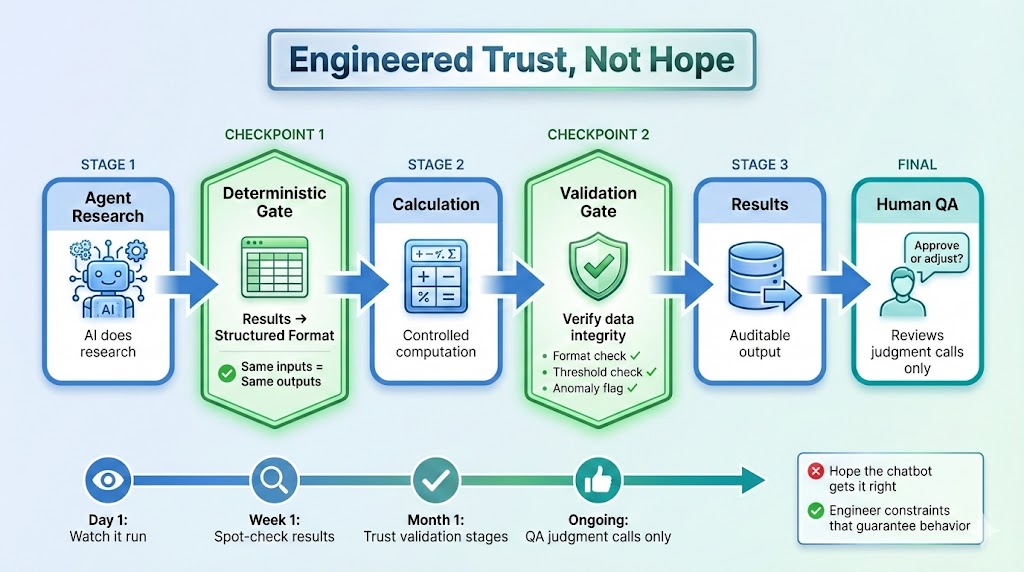
This isn’t “give a chatbot your task and hope it gets it right.” That’s the anxiety everyone has with AI. Unpredictable outputs. Different results each time. No way to verify.
The SDK gives you the flexibility to build logic around the AI. You decide where to add control. You decide what needs to be deterministic. An example of what you can do:
Deterministic checkpoints: Agent does research, but you route the output into a deterministic spreadsheet. The calculation that follows? Your code. Controlled. Auditable. Same inputs, same outputs.
Validation loops: Between agent stages, you add validation. Check outputs against expected formats. Verify data integrity. Flag anomalies. The AI doesn’t do this. Your pipeline logic does.
Artifacts you can audit: Every run produces artifacts. You can store them, diff them against previous runs, re-run with the same inputs, and approve before action. This isn’t “trust feelings”. It’s observable, verifiable state.
Engineered trust: You’re not hoping the agent behaves. You’re building constraints around it that guarantee behaviour.
This isn’t magic baked into the SDK. It’s what becomes possible when you have a pipeline architecture. You control the flow. You add the checkpoints. You decide how much freedom to give versus how much to constrain.
Think about it: how hard is it to open an application and export something? Once you see that being done correctly, 100%, every single day, why would you do it yourself anymore?
Confidence builds incrementally. First you watch the pipeline run. Then you spot-check results. Then you trust the validation stages. Eventually, you just QA the judgment calls.
That’s not blind trust. That’s earned trust through auditable artifacts and deterministic verification.
The SDK as Harness
Think of AI models as wild horses. Powerful. Fast. Capable of amazing things. But also unpredictable. Prone to running in unexpected directions.
Everyone’s solution? Give the horses more freedom. Let them run wild. Hope they go where you want.
That’s not how you build production systems.
SDKs harness AI:
- Tool allowlists: the agent can only use what you declare
- Permission boundaries: explicit limits on what’s accessible
- Workflow constraints: stages must complete in order
- Deterministic checkpoints: verify before proceeding
- Fail-fast on errors: no retry with random alternatives
The wild horse metaphor isn’t just colourful language. It’s accurate. You harness AI through SDKs. You give it structure. You make it reliable.
The Starter Kit: What You Get, Not What You Build
I want to be clear about something: this isn’t about teaching you to build from scratch.
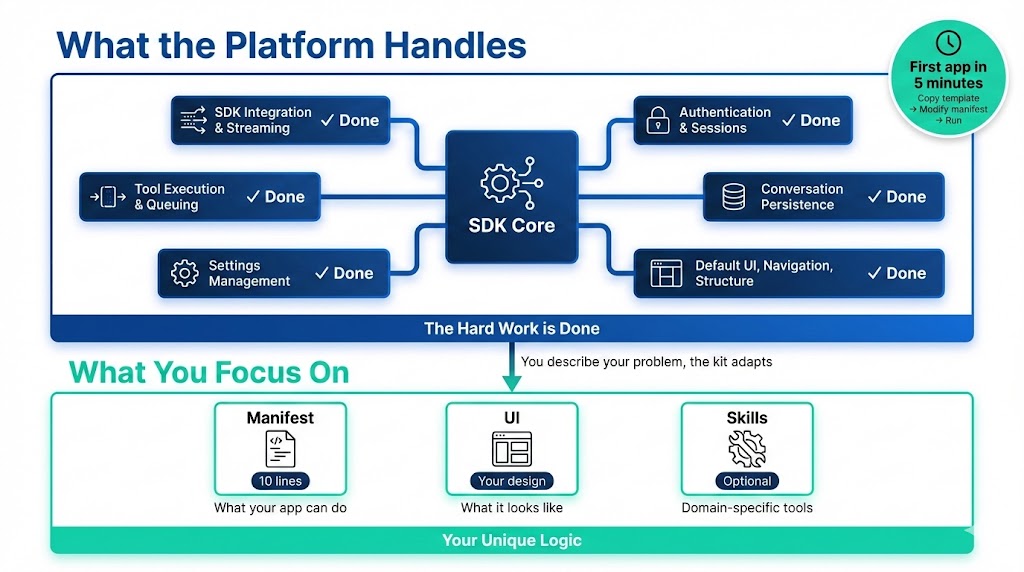
The hard work is done. The starter kit gives you:
- SDK integration and streaming: done
- Authentication and sessions: done
- Tool execution and queuing: done
- Conversation persistence: done
- Settings management: done
- Default UI, navigation, structure: done
You’re not building upfront. You’re describing your problem, and the kit adapts.
Your first app in 5 minutes:
- Copy the template
- Modify the manifest (10 lines declaring what your app can do)
- Run
npm run dev
Your app appears in the sidebar. But here’s the key: you just declared a pipeline-capable application. The platform gives you a UI client for it. The same pipeline can run from the harness, from a schedule, from a webhook.
The manifest is a contract:
export const myApp: AppManifest = {
  id: 'my-app',
  skills: ['pdf', 'docx'],  // ONLY these tools
  systemPrompt: 'You are a specialized assistant for...'
};
The AI cannot discover additional tools at runtime. It’s locked to what’s declared. That’s architectural enforcement, not hoping the AI behaves.
Beyond the UI
The UI is a bridge. A familiar interface to introduce agent delegation. But as confidence builds, you realise it’s just one client among many.
Other clients work too:
- Slack bot: “@pipeline run ai-news-tweet” → results posted to channel
- Email trigger: Forward an email → pipeline processes it → you get notified
- Webhook/API: External system calls your endpoint → pipeline runs → results returned
- Scheduled job: Cron runs overnight → you review in the morning
When you trust the pipeline, when you trust the validation checkpoints, do you need to watch it happen? Or do you just need the results?
Patterns and Surfaces
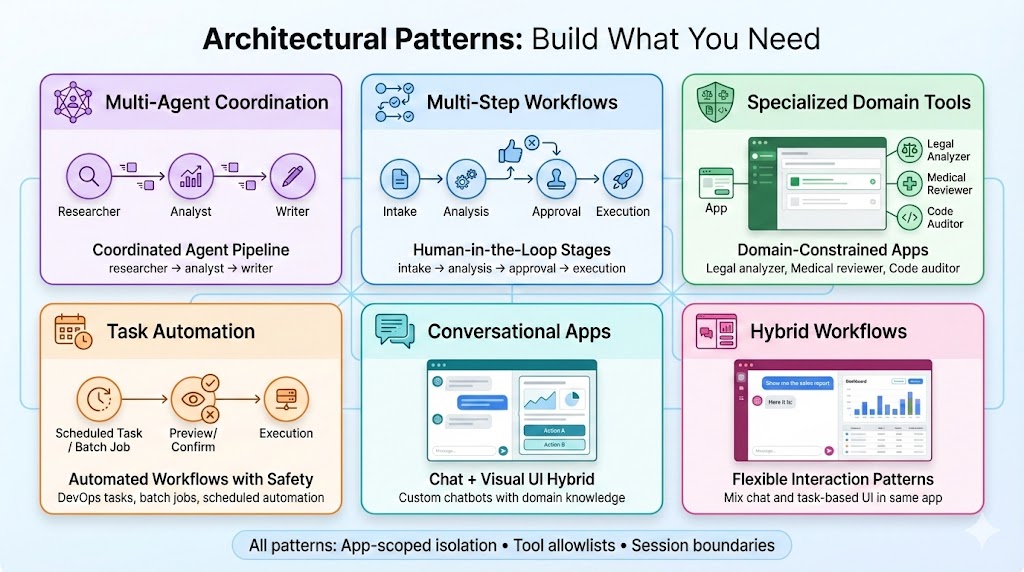
One distinction worth making: pipeline patterns (scheduled, event-triggered, multi-agent, human-in-the-loop) are separate from delivery surfaces (UI, API, Slack, email, headless).
Any pattern can use any surface. A scheduled multi-agent pipeline might deliver to Slack. A human-in-the-loop pipeline might use the UI for approvals. Don’t conflate how the logic runs with how you interact with it.
The starter kit includes working demos of these patterns.
Stop Describing, Start Showing
The uncomfortable truth I realised while preparing this post.
Describing what an SDK can do, that’s what everyone does. Features. Capabilities. Technical specifications.
Nobody gets it.
But showing them? That lands. The triad:
- UI demo: Open the app, click Run, watch stages execute, approve the result
- Harness test: Run
npm run test:ai-news-tweet, see the same pipeline run headlessly - Scheduled run: Pipeline runs overnight, you review in the morning. Results waiting for you
Same pipeline, three entry points. Now you see the separation. Now you understand why the UI is optional.
It’s not magic. You still work through it. But you see the potential immediately. You see the pipeline running. You see the UI rendering results. You see the bridge from developer harness to something you can actually hand to someone.
That’s the shift.
The Lesson: Old Principles, New Application
This connects back to something I’ve written about before.
Waterfall taught us structure. Agile taught us velocity. DevOps taught us automation.
Pipelines teach us separation.
Same pattern: principles from earlier paradigms becoming relevant again, but applied differently.
The assembly line didn’t put humans out of work. It changed what humans did. They stopped doing repetitive tasks and started doing judgment tasks.
That’s what pipelines do for knowledge work. The mundane stuff (open app, export data, run calculation, check threshold), that’s the pipeline. The judgment (should we act on this recommendation?), that’s the human.
Documentation discipline from the late 90s wasn’t wrong. It just needed AI collaboration to become valuable again. (See From Waterfall to AI)
Determinism from traditional software engineering isn’t outdated. It’s exactly what AI systems need to be trustworthy.
Wild horses need harnesses. Wild AI needs SDKs. And the harness isn’t the product. The pipeline is the product. The harness just makes it reliable.
What’s Next
The Claude Agent SDK Starter Kit is available now: github.com/vanzan01/claude-agent-sdk-starter
You have everything you need to build pipeline-first applications that anyone can actually use.
Think about your use case:
- What work could run overnight without anyone clicking?
- What would you review in the morning instead of doing manually?
- Where are you stuck at the CLI layer?
Build the pipeline first. The UI is optional.
Stop hoping AI behaves. Start engineering it to behave.
Reflection Questions
I’m curious about your experience:
- Have you tried showing AI tools to non-technical people? How did it go?
- What mundane workflows could become scheduled pipelines?
- Are you stuck at the CLI layer? What would it take to productise?
- What would you trust to run overnight without you watching?
Let’s discuss. I’d love to hear what patterns you’re discovering.
Published: January 10, 2026 Author: Nick (vanzan01) Location: Perth, Australia